
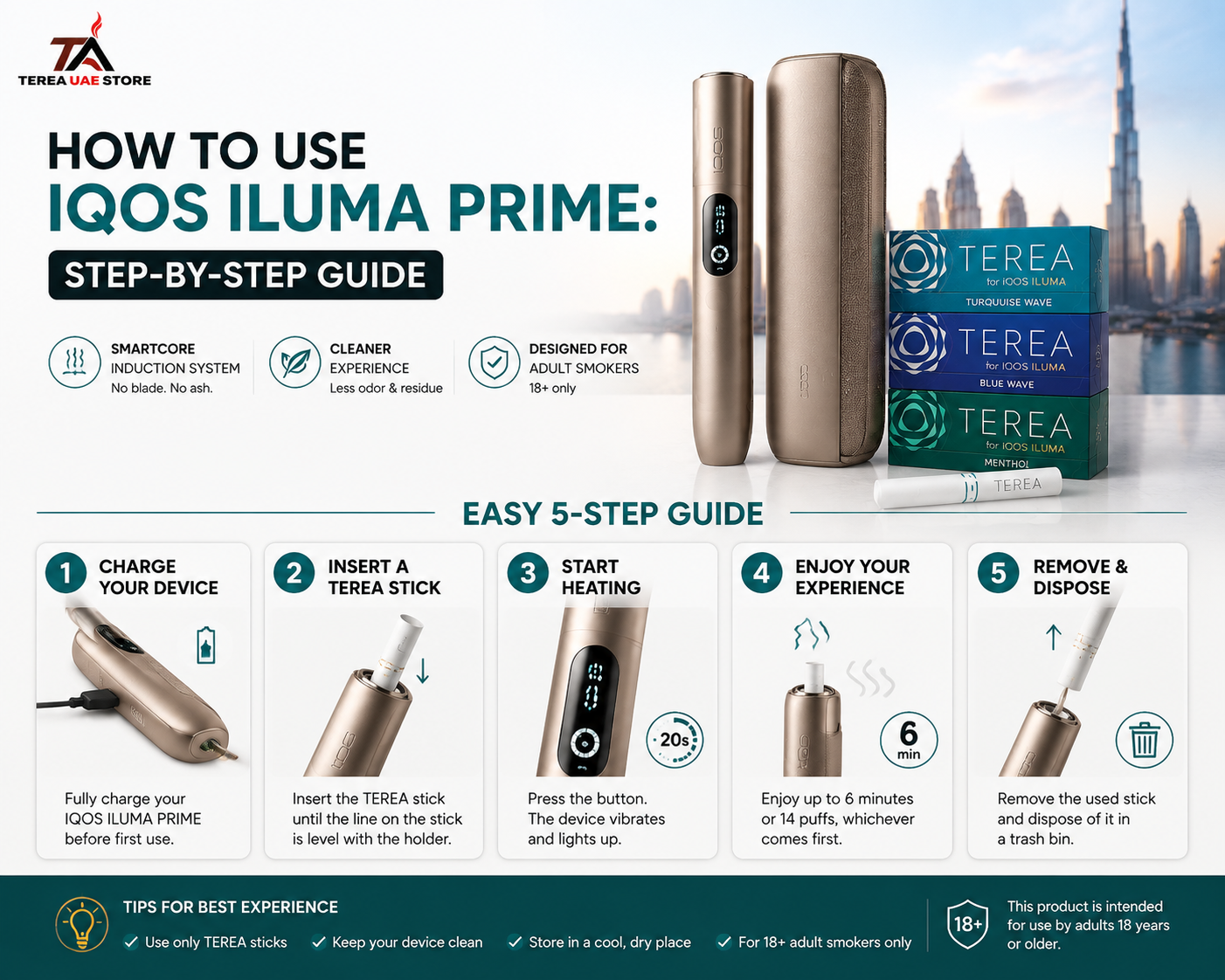
How to use IQOS ILUMA PRIME correctly starts with identifying the exact model, fully charging the Pocket Charger, inserting one compatible TEREA stick into the Holder, and waiting for the readiness signal before beginning. On the original IQOS ILUMA PRIME, one vibration with slowly pulsing lights means the stick is heating; two vibrations with the status light on mean it is ready. A session lasts up to roughly 6 minutes or 14 puffs, whichever comes first, and another two vibrations warn that about 30 seconds or two puffs remain.
The process is simple once you understand the signals. The main mistakes come from confusing IQOS ILUMA PRIME with IQOS ILUMA i PRIME, using the wrong stick, starting before preheating finishes, or misunderstanding what the lights and vibrations mean.
This guide covers the original IQOS ILUMA PRIME. A separate section explains what changes if your device is the newer ILUMA i PRIME.
IQOS and TEREA are not risk-free and provide nicotine, which is addictive. They are intended only for adults who would otherwise continue smoking or using nicotine products.
IQOS ILUMA PRIME First-Time Use at a Glance
| Step | What to Do | What You Should See/Feel |
|---|---|---|
| 1 | Fully charge Pocket Charger | Full status bar |
| 2 | Hold Pocket Charger button for 4 sec | Device turns on |
| 3 | Check Holder charge | 2 lights = 2 uses, 1 = 1 use |
| 4 | Remove Holder | Ready for TEREA |
| 5 | Insert one TEREA stick | AutoStart can activate |
| 6 | Wait during preheating | 1 vibration + pulsing lights |
| 7 | Begin after readiness | 2 vibrations + steady light(s) |
| 8 | Follow remaining-use signals | Double-tap can show progress |
| 9 | Watch for final warning | 2 vibrations = ~30 sec / 2 puffs left |
| 10 | Remove used stick | Use a new TEREA next time |
| 11 | Return Holder to Pocket Charger | Holder begins recharging |
Official IQOS UAE gives the same basic operating sequence for the original ILUMA PRIME.
Before You Start: ILUMA PRIME or ILUMA i PRIME?
This is the most important check because Google often mixes results for the two devices.
They are not the same model.
Original IQOS ILUMA PRIME
The device covered in this guide has:
- Separate Holder and Pocket Charger
- No Touch Screen
- AutoStart
- Smart gestures
- Two consecutive Holder uses
- TEREA compatibility
IQOS ILUMA i PRIME
The newer generation adds:
- Touch Screen
- Pause Mode
- FlexPuff
- FlexBattery
- Up to three consecutive experiences under supported Performance Mode conditions
So if your Holder has a Touch Screen, this is not the original ILUMA PRIME. You are using the newer ILUMA i PRIME.
Terea UAE Store already has a separate overview explaining the newer IQOS ILUMA i PRIME, so keeping these two intents separate prevents incorrect operating instructions from being mixed together.
Step 1: Fully Charge IQOS ILUMA PRIME Before First Use
Before using a new device for the first time, fully charge the Pocket Charger.
Official IQOS UAE guidance gives an approximate full charging time of 135 minutes.
Use the appropriate manufacturer-approved charging equipment.
To check Pocket Charger battery level, briefly press the charger button.
The light bar shows the remaining charge.
What if the Battery Is Completely Flat?
A deeply discharged device may not show a normal charging light immediately.
IQOS UAE notes that it can take up to approximately 20 minutes before a light pattern appears when the battery has been deeply discharged.
That means a completely dark charger does not necessarily indicate failure immediately after connecting it.
Allow some charging time first.
Step 2: Turn IQOS ILUMA PRIME On
Press and hold the button on the top of the Pocket Charger for approximately four seconds.
Then release.
The status lights should activate.
The same long press is used to switch the system off.
You normally do not need to power the system off and on before every individual use.
Step 3: Check How Many Holder Uses Are Available
Before removing the Holder, check its status lights.
For the original IQOS ILUMA PRIME:
Two lights
The Holder is fully charged and ready for two uses.
One light
One use remains.
No lights
The Holder needs to be recharged inside the Pocket Charger.
Official IQOS UAE confirms that the original Holder supports two consecutive experiences from a full Holder charge.
This is different from the newer ILUMA i PRIME, which can support up to three consecutive experiences under particular Performance Mode conditions.
Step 4: Insert the TEREA Stick Correctly
Remove the Holder from the Pocket Charger.
Take one new TEREA stick and insert it gently into the Holder.
Do not:
- Force it
- Twist it aggressively
- Crush it
- Cut it
- Open it
- Reuse a previously used stick
The filter/mouthpiece remains outside the Holder.
TEREA is designed as a single-use SMARTCORE stick for the ILUMA induction system.
Can You Use HEETS in IQOS ILUMA PRIME?
No.
The ILUMA platform does not have the exposed heating blade used by older IQOS generations.
TEREA contains the internal component required by the SMARTCORE induction system.
Therefore, older HEETS and TEREA should not be treated as interchangeable consumables.
Step 5: Wait for AutoStart and Preheating
One of the useful features of IQOS ILUMA PRIME is AutoStart.
Once a compatible TEREA stick is inserted correctly, the Holder can automatically begin heating.
Official IQOS guidance describes the signals as:
One vibration + slowly pulsing lights = TEREA is heating.
Do not begin immediately.
Wait for the next signal.
When the Holder gives:
Two vibrations + light(s) staying on = ready.
That is when the preheating process has completed.
If AutoStart has been disabled, the Holder button can be used to start the experience manually.
How Long Does IQOS ILUMA PRIME Take to Heat Up?
Official IQOS troubleshooting information for the ILUMA platform describes approximately 20 seconds of preheating before normal use.
Rather than counting seconds manually, the better approach is to follow the Holder’s signals.
Start only after the second vibration and steady light indication.
The device is designed to tell you when it is ready.
How Do You Use IQOS Correctly After Preheating?
A common Google query is “How to smoke IQOS correctly?”
Technically, IQOS is not used by burning tobacco like a cigarette. The ILUMA system heats the tobacco in the TEREA stick through induction.
Once the Holder signals readiness, use the device according to the normal session cycle.
Official IQOS UAE troubleshooting advises allowing reasonable intervals between puffs so the Holder has time to maintain the intended heating process and aerosol generation.
There is no benefit in pulling repeatedly as fast as possible.
The device is designed around a time-and-puff-limited experience.
How Many Puffs Is One IQOS Session?
For the original IQOS ILUMA platform, an experience is designed to last up to:
14 puffs or approximately 6 minutes, whichever comes first.
This is important because the session can finish in two different ways.
If You Reach 14 Puffs First
The session ends even if six minutes have not passed.
If Six Minutes Pass First
The session ends even if fewer than 14 puffs were taken.
Near the end, the Holder gives another warning.
Official IQOS PRIME instructions state that two vibrations mean approximately:
- 30 seconds remain, or
- 2 puffs remain
Can You Get More Than 14 Puffs?
Not with the original IQOS ILUMA PRIME’s normal design.
The newer IQOS ILUMA i PRIME is different.
Its FlexPuff feature may provide up to four additional puffs depending on individual usage patterns, while still remaining within the supported six-minute experience duration. FlexPuff does not activate for every experience and is not available in the same way when Pause Mode is used.
This is another reason not to mix original PRIME instructions with i PRIME instructions.
How Do You Know How Much Time Is Left?
The original IQOS ILUMA PRIME has a useful double-tap gesture.
During a session, double-tap the Holder.
The Holder responds with vibrations indicating approximate remaining experience:
- 3 vibrations: roughly 75–50% remaining
- 2 vibrations: roughly 50–25%
- 1 vibration: less than 25%
This can be useful when you want to know how much of the session remains without waiting for the final warning.
What Does the Lift-Up Gesture Do?
When the Holder is not currently in an active experience, lifting it can show how many uses remain.
The lights indicate whether the Holder has:
- Two uses
- One use
- No usable charge
This avoids repeatedly placing the Holder back into the Pocket Charger simply to check its battery status.
What Happens When the Session Is Almost Finished?
Near the end, the Holder vibrates twice again.
That does not mean something is wrong.
It indicates the final part of the experience.
Approximately:
30 seconds or two puffs remain.
Once the session ends, remove the used TEREA stick.
Do not put the same stick back in for another session.
TEREA is designed for single use.
How Do You Remove TEREA After Use?
Wait until the supported session finishes.
Then gently pull the used TEREA stick straight out of the Holder.
Avoid:
- Twisting aggressively
- Breaking it inside
- Cutting it open
- Reusing it
If a stick becomes damaged or unusually difficult to remove, do not force another stick into the Holder on top of it.
Check the Holder before the next use.
How Do You Recharge the IQOS ILUMA PRIME Holder?
Place the Holder back inside the Pocket Charger.
The two round Holder-status lights on the charger show what is happening.
Pulsing White Lights
The Holder is charging.
One Solid Round Light
One Holder experience is available.
Two Solid Round Lights
The Holder is fully charged for two experiences.
A fully charged Pocket Charger can provide up to approximately 20 Holder experiences before the Pocket Charger itself needs recharging.
What Does a Yellow Light Mean?
Yellow normally points toward low battery.
For the original ILUMA PRIME, official IQOS guidance states:
- Bottom Pocket Charger light flashing yellow three times → Pocket Charger charge is low.
- Lower Holder light blinking yellow three times → Holder needs charging.
The correct first response is charging—not repeatedly inserting and removing TEREA.
Does IQOS ILUMA PRIME Need Cleaning?
It does not require the same internal blade-cleaning routine used with older blade-based IQOS systems.
The reason is the design.
TEREA has a sealed tobacco section, while the ILUMA Holder uses SMARTCORE induction rather than inserting an exposed heating blade into loose tobacco.
This means you do not have to brush tobacco residue away from a heating blade after normal use.
However, “no blade cleaning” does not mean “zero device care.”
You should still:
- Keep the Holder dry
- Keep Pocket Charger contacts clean
- Avoid inserting foreign objects
- Protect the device from liquids
- Avoid damaged TEREA sticks
- Follow official care instructions
How to Start IQOS if AutoStart Does Not Work
If you insert a TEREA stick and nothing appears to happen, do not immediately assume the device is broken.
Check in this order.
1. Is the Holder Charged?
No light may mean no usable Holder charge.
2. Is the Device Turned On?
The Pocket Charger system should be powered on.
3. Is the TEREA Stick Compatible and Inserted Correctly?
Do not use HEETS.
4. Has AutoStart Been Disabled?
Official IQOS guidance says the Holder button can manually start the experience when AutoStart is disabled.
5. Is the Stick Previously Used?
Use a fresh TEREA.
If the device still does not start after these checks, use official diagnostics rather than repeatedly forcing the Holder to activate.
Why Does My IQOS Session Feel Too Short?
First compare it against the official design limit.
One normal ILUMA experience is up to approximately:
14 puffs or six minutes.
If you take puffs rapidly, you may reach the 14-puff limit before six minutes.
If you use it more slowly, the time limit may arrive first.
Also check whether:
- The stick was already used
- TEREA was inserted correctly
- The correct end was facing outward
- The stick was stored properly
- You are mistaking the final warning for immediate session termination
IQOS UAE also notes that improper or extreme TEREA storage conditions can affect product performance.
Which End of TEREA Goes Into IQOS?
The mouthpiece/filter end should remain outside the Holder.
Official IQOS troubleshooting notes that TEREA has filter material at both ends, making it possible for beginners to become confused, but the mouthpiece filter must remain outside the device.
Do not simply push whichever end enters first.
Correct orientation matters.
Can You Reuse a TEREA Stick?
No.
A TEREA stick is designed for one supported session.
After the session finishes, remove it and use a fresh stick for the next experience.
Reinserting a used stick does not restore the original intended experience.
It can also confuse troubleshooting because an already-used consumable may not perform normally.
How to Use IQOS ILUMA i PRIME for the First Time
One of the queries you supplied was:
“How to use IQOS ILUMA i for the first time?”
If the searcher actually means IQOS ILUMA i PRIME, the workflow changes slightly.
For the newer i PRIME:
- Hold the Pocket Charger button for four seconds to power on.
- Place the Holder in the Pocket Charger and ensure it is charged.
- Fully charge the Pocket Charger for around 135 minutes before first use.
- Remove the Holder.
- Insert a TEREA SMARTCORE stick up to the filter line.
- AutoStart begins preheating, or the Touch Screen can be used.
- Wait for the second vibration.
- Follow the Touch Screen countdown.
- Remove the used stick when finished.
- Return the Holder to the Pocket Charger.
The important visual difference is the Touch Screen.
If your Holder has it, follow i PRIME instructions rather than the original PRIME instructions above.
Original ILUMA PRIME vs ILUMA i PRIME Controls
| Feature | ILUMA PRIME | ILUMA i PRIME |
|---|---|---|
| AutoStart | Yes | Yes |
| Holder status lights | Yes | Touch Screen / Light Guide |
| Double-tap gesture | Yes | New screen controls |
| Pause Mode | No | Yes |
| FlexPuff | No | Yes |
| FlexBattery | No | Yes |
| Consecutive Holder uses | 2 | Up to 3 under supported conditions |
| Normal experience | Up to 14 puffs / 6 min | Up to 14 puffs / 6 min |
| Additional puffs | No FlexPuff | Up to 4 possible with FlexPuff |
This table is useful because the two models look related but have different control logic.
8 Common IQOS ILUMA PRIME First-Time Mistakes
1. Starting After the First Vibration
The first vibration indicates preheating.
Wait for the second readiness vibration.
2. Using HEETS
Original ILUMA PRIME is designed for TEREA SMARTCORE sticks.
3. Reusing TEREA
Each stick is intended for one session.
4. Confusing PRIME With i PRIME
If your Holder has a Touch Screen, follow i PRIME instructions.
5. Forcing the Stick
Insert it gently.
Unusual resistance should be investigated rather than overcome with force.
6. Thinking Yellow Means Device Failure
Yellow commonly indicates low charge.
7. Assuming Every Session Must Last Exactly Six Minutes
The device can finish when either the puff limit or time limit is reached.
8. Calling the Product a Conventional Cigarette
IQOS heats compatible tobacco sticks through induction rather than lighting and burning them like a cigarette.
The terminology matters because the hardware, operating method, and compatible consumables are completely different.
Final Answer: How Should You Use IQOS ILUMA PRIME?
The easiest way to remember how to use IQOS ILUMA PRIME is:
Charge → power on → check Holder → insert fresh TEREA → wait for second vibration → follow session → remove stick → recharge Holder.
Before first use, allow approximately 135 minutes for a full Pocket Charger charge.
The original Holder supports two consecutive experiences.
After inserting TEREA, the first vibration indicates heating. The second vibration tells you the device is ready.
A normal ILUMA experience is designed for up to approximately 14 puffs or six minutes, whichever comes first. Near completion, another two vibrations warn that approximately 30 seconds or two puffs remain.
The most important beginner mistake to avoid is following instructions for the wrong model.
Original ILUMA PRIME = status lights and smart gestures.
ILUMA i PRIME = Touch Screen, Pause Mode, FlexPuff, and FlexBattery.
For adults researching TEREA handling and compatibility separately, Terea UAE Store already has a dedicated TEREA Sticks Dubai guide, while the newer ILUMA i PRIME has its own overview. Keeping those questions on separate pages gives each article a clearer search intent instead of repeating the same information everywhere.
TEREA and IQOS are not risk-free and provide nicotine, which is addictive.
Frequently Asked Questions About How to Use IQOS ILUMA PRIME
1. How do I use IQOS ILUMA PRIME for the first time?
Fully charge the Pocket Charger, turn it on by holding the button for about four seconds, check the Holder charge, remove the Holder, insert a fresh TEREA stick, wait for the second vibration, and begin only after the readiness signal.
2. How do I start my IQOS?
On the original ILUMA PRIME, inserting a compatible TEREA stick normally triggers AutoStart. If AutoStart is disabled, press the Holder button to begin preheating.
3. How do I know when IQOS ILUMA PRIME is ready?
One vibration with slowly pulsing lights means it is heating. Two vibrations with the light or lights staying on mean it is ready.
4. How many puffs is one IQOS session?
A standard ILUMA experience is designed for up to approximately 14 puffs or six minutes, whichever comes first.
5. How do I smoke IQOS correctly?
Technically, IQOS does not burn tobacco like a cigarette. With ILUMA PRIME, insert a compatible TEREA stick, wait for the readiness signal, and follow the supported puff/time cycle. IQOS guidance also recommends leaving intervals between puffs rather than taking them continuously.
6. Can I use HEETS with IQOS ILUMA PRIME?
No. IQOS ILUMA devices use compatible TEREA SMARTCORE sticks and do not use the exposed blade required by older HEETS-compatible IQOS systems.
7. How long does IQOS ILUMA PRIME take to charge?
Official IQOS UAE guidance gives approximately 135 minutes for a full Pocket Charger charge before first use.
8. How many times can I use the ILUMA PRIME Holder before charging it?
A fully charged original ILUMA PRIME Holder is designed for two consecutive experiences.
9. What does two vibrations mean on IQOS ILUMA PRIME?
It depends on when they occur. After preheating, two vibrations indicate readiness. Near the end of a session, another two vibrations indicate approximately 30 seconds or two puffs remain.
10. Is IQOS ILUMA PRIME the same as IQOS ILUMA i PRIME?
No. ILUMA i PRIME is the newer generation and adds Touch Screen, Pause Mode, FlexPuff, FlexBattery, and different consecutive-use options.