
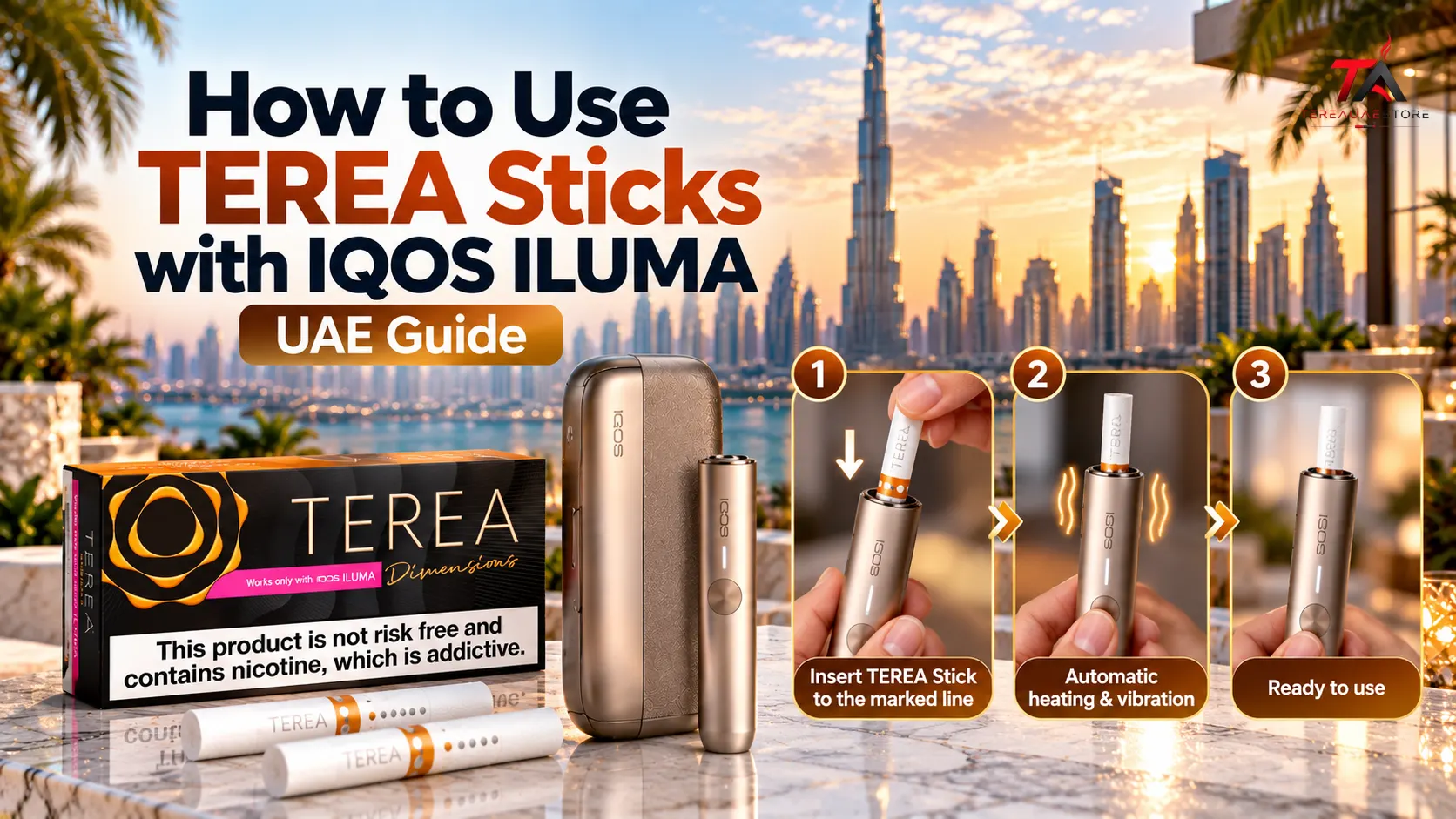
How to Use TEREA Sticks with IQOS ILUMA is straightforward once you understand how the ILUMA system works with its compatible SMARTCORE sticks. Unlike older blade-based IQOS devices, IQOS ILUMA uses the SMARTCORE INDUCTION SYSTEM, with a heating element located inside the TEREA stick.
For adults who already use nicotine or tobacco products, the basic process involves checking the device, inserting a fresh compatible stick correctly, waiting for the ready signal, using the device according to its instructions, and removing the used stick afterward.
The important point is compatibility. TEREA sticks are specifically designed for IQOS ILUMA and should not be used with earlier blade-based IQOS generations.
What Are TEREA Sticks and IQOS ILUMA?
TEREA is a range of SMARTCORE tobacco sticks developed specifically for IQOS ILUMA devices.
The stick and device are designed to function together. The TEREA stick contains a metal heating element within the tobacco section, while the ILUMA Holder generates the induction field that activates it. This means the device does not need the exposed heating blade used in older IQOS models.
How the ILUMA Heating System Works
The basic process can be understood as:
TEREA stick → ILUMA Holder → induction activation → tobacco heating → aerosol generation
The technology is based on induction heating, where electromagnetic energy is used to generate heat through an appropriate heating element.
This design is one of the major differences between IQOS ILUMA and earlier blade-based systems.
Why the Stick and Device Must Match
TEREA is not simply another name for older IQOS consumables.
The TEREA stick contains the component required for the ILUMA heating system. Older IQOS devices use a different heating architecture. Consequently, TEREA and earlier-generation sticks are not interchangeable.
What You Need Before Starting a Session
Before using a TEREA stick, check three basic things:
- Your device is an IQOS ILUMA-compatible model
- The device has sufficient battery
- You have a fresh, undamaged TEREA stick
This simple check can prevent many common problems.
Check Your IQOS Model
TEREA is intended for the IQOS ILUMA family, including compatible ILUMA and ILUMA i devices. The exact controls and features can vary by model, so it is important to identify your device before following model-specific instructions.
Check the Battery
A low battery can interrupt the normal heating process.
For models with a separate Holder and Pocket Charger, make sure the Holder has enough charge before inserting a new stick. The charging and indicator behaviour depends on the particular ILUMA model.
Use a Fresh TEREA Stick
Take one unused stick from the pack.
Do not cut, open, crush, bend excessively, or disassemble the stick. TEREA contains an internal metal heating component designed for the ILUMA system, so modifying the stick is not appropriate.
How to Use TEREA Sticks with IQOS ILUMA Step by Step
Step 1: Prepare the Device
Make sure the ILUMA device is charged and ready.
If you use a model with a separate Pocket Charger and Holder, remove the Holder from the charger.
If you use an all-in-one model such as an ILUMA ONE, use the controls specific to that device.
Step 2: Take One TEREA Stick
Remove one fresh TEREA stick from the pack.
Check that it is intact and has not been damaged.
Do not try to open the tobacco section or inspect the internal heating element.
Step 3: Insert the Stick Correctly
Place the TEREA stick into the Holder gently.
Insert it only to the indicated insertion line. There is no need to push aggressively or force it farther into the device.
Correct positioning allows the SMARTCORE system to operate as designed.
Step 4: Wait for Heating to Begin
On supported ILUMA models and settings, heating can begin automatically after correct insertion.
The device uses lights and vibrations to communicate its status. On the standard ILUMA, the Holder provides signals during the heating process and indicates when the session is ready.
Do not assume that the same indicator sequence applies to every ILUMA model. Newer versions can have additional controls and features.
Step 5: Wait for the Ready Signal
Allow the device to complete its preparation cycle.
When the appropriate ready indication appears, the session can begin.
This short waiting period is important because the device needs to reach its intended operating conditions before use.
Step 6: Use the Device Normally
Once the ready signal appears, use the device according to the instructions supplied for your particular ILUMA model.
There is no need to rotate the TEREA stick or repeatedly adjust its position during a normal session.
Step 7: Watch for the End-of-Session Signal
The device provides an indication when the session is approaching its end.
On compatible ILUMA i models, the manufacturer states that a TEREA experience can last up to 6 minutes or 14 puffs, whichever comes first. Some compatible ILUMA i models can also use FlexPuff, which may provide additional puffs within the stated maximum session duration.
Individual usage patterns can affect the experience.
Step 8: Remove the Used Stick
After the session ends, remove the used TEREA stick carefully.
Do not attempt to use the same stick again.
TEREA sticks are designed for single use.
Step 9: Dispose of the Stick Properly
Place the used stick in an appropriate waste container.
Keep used and unused TEREA products away from children and pets.
Step 10: Return or Recharge the Device
If your model uses a separate Holder and Pocket Charger, return the Holder to the Pocket Charger when required.
For an all-in-one model, recharge the device according to its specific instructions.
How Do You Know When IQOS ILUMA Is Ready?
The device communicates its operating status through lights and vibrations.
A typical sequence involves:
Insertion → heating begins → preparation signal → ready signal → session → end signal
The exact sequence can vary according to the ILUMA model.
Why the Indicators Matter
The indicators help you understand whether:
- The device has started heating
- The device is ready
- The battery is low
- The session is almost finished
- The device requires attention
Therefore, learning the indicators for your specific model is more useful than memorizing one universal sequence.
Does IQOS ILUMA Automatically Start Heating?
Supported IQOS ILUMA models can use AutoStart when the compatible setting is enabled.
After a TEREA stick is inserted correctly, the device can automatically begin its heating cycle. Official IQOS UAE information describes AutoStart as one of the features available within the ILUMA system.
However, model features are not identical across the entire ILUMA family.
AutoStart on Different Models
Some devices provide automatic activation after insertion, while newer ILUMA i models can include additional smart functions.
If AutoStart does not activate, do not repeatedly push or manipulate the stick. Instead, check the device’s instructions and operating status.
Can You Use TEREA With IQOS ILUMA ONE?
Yes. TEREA sticks are designed for compatible IQOS ILUMA devices, and the ILUMA ONE belongs to this platform.
The ILUMA ONE uses an all-in-one design rather than the separate Holder and Pocket Charger arrangement found on the standard ILUMA. The operating controls are therefore different, although the fundamental TEREA compatibility remains the same.
Basic ILUMA ONE Workflow
The general sequence is:
Charge → Insert TEREA → Wait for heating → Use → Remove → Dispose
Always follow the instructions for your specific version.
Can You Use TEREA With IQOS ILUMA i?
Yes. TEREA is designed for the IQOS ILUMA i family.
Current IQOS UAE information identifies TEREA as the consumable designed for IQOS ILUMA and ILUMA i devices.
ILUMA i models can also provide additional features depending on the specific device, such as Pause Mode, Touch Screen, FlexPuff, or other smart functions.
Therefore, the basic stick procedure remains familiar, while the available device controls can differ.
Can You Use TEREA With Older IQOS Devices?
No.
This is one of the most important compatibility rules.
TEREA sticks are designed for IQOS ILUMA’s induction-based heating system. Older IQOS generations use blade-based heating technology and were designed for different consumables.
TEREA and Older Blade-Based Sticks
| Feature | TEREA + IQOS ILUMA | Older IQOS System |
|---|---|---|
| Heating technology | Induction | Blade heating |
| Heating blade | No exposed blade | Heating blade |
| Compatible consumable | TEREA SMARTCORE | Older compatible sticks |
| Tobacco stick design | Sealed SMARTCORE design | Different stick construction |
| Interchangeable | No | No |
Using an incompatible stick can cause device problems or damage, so always confirm the device and consumable combination before use.
Can You Use HEETS With IQOS ILUMA?
No.
HEETS are associated with earlier blade-based IQOS systems, while TEREA SMARTCORE sticks are designed for IQOS ILUMA.
The official IQOS UAE guidance specifically explains that TEREA should be used with ILUMA and that older-generation IQOS devices use different heating technology.
This distinction is especially important for people upgrading from an IQOS 3 DUO or another older device.
How Long Does a TEREA Session Last?
The stated experience depends on the specific ILUMA model.
For IQOS ILUMA i, official UAE information states that the experience can last up to 6 minutes or 14 puffs, whichever comes first. Compatible devices with FlexPuff may provide additional puffs while remaining within the stated maximum session duration.
Actual usage can vary because puffing patterns affect session behaviour.
Therefore, the manufacturer’s published figures should be viewed as the device’s stated operating parameters rather than a promise of identical results for every user.
Does IQOS ILUMA Need Traditional Blade Cleaning?
The ILUMA system does not use the exposed heating blade found in older IQOS devices.
Because the heating element is located inside the compatible TEREA stick, the Holder does not require the traditional blade-cleaning routine associated with older blade-based IQOS devices.
However, this does not mean the device can be exposed to water, dirt, or improper handling.
Keep the Device Dry
Avoid allowing liquids to enter the device.
Do not dismantle the Holder or Pocket Charger to perform unofficial repairs.
If the device becomes wet, damaged, unusually hot, or behaves unexpectedly, follow the manufacturer’s support instructions.
What Is Inside a TEREA Stick?
Understanding the basic construction explains why compatibility matters.
A TEREA SMARTCORE stick contains several functional components.
Tobacco Section
This contains the specially prepared tobacco blend.
Internal Heating Element
A metal element is positioned within the stick and works with the ILUMA induction system.
Front Seal
The sealed design helps keep the tobacco contained within the stick.
Airflow Chamber
The internal structure helps manage the airflow through the stick during the session.
Cooling Component
The stick also contains a cooling component designed to manage the temperature of the aerosol.
Filter and Mouthpiece
The filter section forms the part used as the mouthpiece.
Because these components are integrated into the stick, users should not cut or disassemble it.
What Happens If TEREA Is Inserted Incorrectly?
Incorrect insertion can prevent the device from operating normally.
If the device does not start:
Check the Insertion Position
Make sure the stick is inserted to the appropriate line.
Check the Stick
Make sure it is fresh and undamaged.
Check the Battery
The device may need charging.
Check Compatibility
Confirm that you are using TEREA with an IQOS ILUMA-compatible device.
Do Not Force the Stick
If it does not insert normally, do not push harder.
Repeatedly forcing a stick can create unnecessary pressure on the Holder.
Common TEREA and IQOS ILUMA Mistakes
i. Using an Incompatible Stick
Using a stick designed for another IQOS generation can cause compatibility problems.
ii. Using TEREA With an Older Blade Device
TEREA is designed for ILUMA rather than previous blade-based models.
Pushing the Stick Too Far
Always follow the marked insertion position.
Reusing a Used Stick
TEREA sticks are designed for one session and should not be reused.
Cutting the Stick
The internal structure should not be modified.
Ignoring the Ready Signal
Allow the device to complete its heating process before beginning the session.
Ignoring Device-Specific Instructions
ILUMA models can differ in controls, indicators, charging systems, and smart functions.
Attempting Unofficial Repairs
If the device develops a technical issue, use the manufacturer’s troubleshooting and support information rather than dismantling it.
How to Store TEREA Sticks Correctly
Proper storage helps keep the packaging and sticks in suitable condition.
Store unopened packs in a clean, dry place and follow the storage guidance supplied with the product.
Avoid exposing the packs to:
- Excessive heat
- Excessive moisture
- Direct damaging environmental conditions
- Crushing or heavy pressure
Keep TEREA products away from children and pets.
Why Storage Matters
The stick is a manufactured consumable with multiple internal components. Excessive heat, moisture, or physical damage can affect the condition of the packaging or product.
Therefore, a stable storage environment is preferable to leaving packs in unsuitable locations such as direct sunlight or areas exposed to excessive humidity.
How to Choose the Right TEREA Flavour
Once you understand the device process, the next decision is often flavour selection.
The TEREA range includes tobacco-led, menthol, and aromatic profiles. Official IQOS UAE currently categorizes its range across different flavour types and intensity characteristics.
Tobacco-Led Profiles
Options such as Yellow, Amber, Sienna, Silver, and Teak can provide different tobacco and aroma characteristics.
Menthol Profiles
Menthol options provide a cooling component and can vary in their aromatic direction.
Aromatic Profiles
Some TEREA products combine tobacco with distinctive aromatic notes, giving users a wider range of flavour characteristics.
The best way to compare products is to look at the actual flavour description, cooling level, aroma, intensity, and market edition rather than relying only on pack colour.
Why TEREA Market Editions Can Be Different
TEREA products can be sold in different regional markets, and product names, packaging, available variants, and descriptions may differ between countries.
This is particularly relevant for UAE customers researching imported Japanese, Italian, Swiss, Indonesian, Uzbekistan, or other market editions.
Terea UAE Store currently organizes products by several market categories, including Japan, Italy, Indonesia, Switzerland, Uzbekistan, and Kyrgyzstan.
What to Check Before Ordering
When comparing an imported TEREA product, check:
- Exact product name
- Market or country edition
- Flavour profile
- Packaging information
- Pack quantity
- Device compatibility
- Product condition
This makes it easier to distinguish similarly named variants from different markets.
How to Compare TEREA Products Before Buying
A useful comparison does not need to focus only on flavour names.
Consider five attributes.
Tobacco Character
Is the tobacco profile mild, balanced, rich, toasted, or aromatic?
Aroma
Look for descriptors such as woody, nutty, creamy, zesty, herbal, berry, or tropical.
Cooling
Some variants have little or no cooling, while others include menthol characteristics.
Capsule
Pearl products may have a capsule-based flavour transition, while many standard TEREA variants do not.
Market Edition
Check whether the product comes from Japan, Italy, Switzerland, Indonesia, or another market.
This method provides a more accurate comparison than simply choosing based on colour.
TEREA and IQOS ILUMA: A Simple Beginner’s Checklist
Before every session, remember:
1. Check the device
Make sure it is compatible with TEREA.
2. Check the battery
Make sure sufficient power is available.
3. Use a fresh stick
Do not reuse or modify a TEREA stick.
4. Insert correctly
Follow the marked insertion line.
5. Wait
Allow the device to signal that it is ready.
6. Use normally
Follow the operating instructions for your specific model.
7. Remove
Take out the used stick after the session.
8. Dispose
Do not reuse the stick.
This sequence covers the essential operating process without confusing ILUMA with earlier IQOS generations.
Important Safety Information
TEREA products contain nicotine, which is addictive, and they are not risk-free. They are intended only for adults who would otherwise smoke or use nicotine products. TEREA sticks also contain an internal metal component and should not be ingested or disassembled.
Keep both the device and TEREA sticks away from children and pets.
Always follow the instructions provided with your exact IQOS ILUMA model and applicable local requirements.
Conclusion
Learning how to use TEREA sticks with IQOS ILUMA is mainly about understanding the relationship between the SMARTCORE stick and the induction-based device.
The essential process is simple: check the device, use a fresh compatible TEREA stick, insert it correctly, wait for the ready indication, follow the device instructions, and remove the used stick when the session ends.
The most important compatibility rule is equally straightforward: TEREA is designed for IQOS ILUMA and should not be used with older blade-based IQOS devices.
Once the basic process is understood, users can also make more informed comparisons between TEREA flavours by looking at tobacco character, aroma, cooling, capsule format, intensity, and market edition.
For UAE customers researching different TEREA options, checking the exact product name and market edition before ordering can also help avoid confusion between similarly named variants.
Frequently Asked Questions
1. How to Use TEREA Sticks with IQOS ILUMA?
Use a compatible ILUMA device, insert a fresh TEREA stick to the marked line, wait for the ready signal, use the device according to its instructions, and remove the used stick after the session.
2. Can TEREA sticks be used with IQOS ILUMA?
Yes. TEREA SMARTCORE sticks are specifically designed for compatible IQOS ILUMA devices.
3. Can I use TEREA with IQOS 3 DUO?
No. TEREA is designed for the IQOS ILUMA induction-heating system and is not intended for older blade-based IQOS devices.
4. Can I use HEETS with IQOS ILUMA?
No. HEETS and TEREA are designed for different IQOS heating platforms. ILUMA is designed for compatible TEREA SMARTCORE sticks.
5. Does IQOS ILUMA automatically heat TEREA?
Supported ILUMA models can use AutoStart to begin heating after correct stick insertion, depending on the model and settings.
6. How far should I insert a TEREA stick?
Insert the stick gently to the indicated insertion line. Do not force it farther into the Holder.
7. Can I reuse a TEREA stick?
No. TEREA sticks are intended for single use and should be removed and disposed of after the session.
8. Does IQOS ILUMA have a heating blade?
No. ILUMA uses the SMARTCORE INDUCTION SYSTEM instead of the exposed heating blade used in earlier IQOS devices.
9. How long does a TEREA session last?
With compatible IQOS ILUMA i devices, the manufacturer states that the experience can last up to 6 minutes or 14 puffs, whichever comes first. Some supported devices can provide additional FlexPuff functionality.
10. What should I do if IQOS ILUMA does not start heating?
Check the battery, confirm that you are using a compatible TEREA stick, check the insertion position, and review the instructions for your specific model. Do not force the stick or dismantle the device.